Pages

Thursday, 13 March 2014

OpenFileDialog in C#


Hi Friends, 

This tutorial is a continuation of First C# Windows Form Application. So now you know how to create a Windows Form Application in c#. Here you will learn how to use OpenFileDialog. OpenFileDialog is a control that allows users to browse folders and select files.

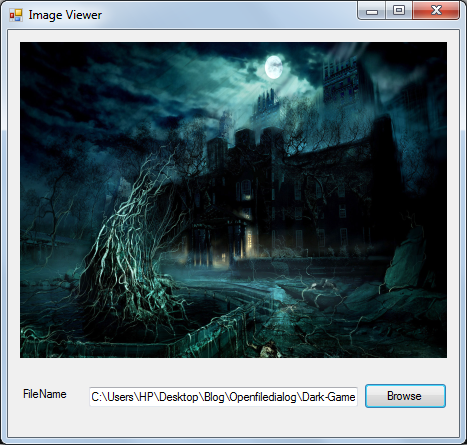
Here is a tutorial for creating an Image Viewer with OpenFileDialog. 


Steps

Thursday, 6 March 2014

First C# Windows Form Application


Hello All,

This is a very simple tutorial on how to create a Windows Form Application in c#.

Requirements

Visual Studio 2008 or higher versions.

What is Windows Forms?
Windows Forms (WinForms) is the name given to the graphical application programming interface (API) included as a part of Microsoft .NET Framework, providing access to native Microsoft Windows interface elements by wrapping the extant Windows API in managed code. (Wiki definition)

So lets start.

Thursday, 27 February 2014

WCF Tutorial for Beginners


Definition of WCF 

Windows Communication Foundation (WCF) is a framework for building service-oriented applications. Using WCF we can build secure, reliable, transacted solutions that integrate across platforms.

Wednesday, 19 February 2014

How to play Video as wallpaper using VLC

Friends, 

Today softsprogrammer is here to share a trick to set any video as your Desktop Wallpaper using VLC Player. VLC Player is a powerful Video Player which has got a lot of features. To learn more features,  please follow this link

Monday, 17 February 2014

Hide Folders in Windows using Command Prompt (Hidden Trick)

Friends,

We all know how to hide a folder in Windows.
Just Right Click on the Folder -> Properties -> Check the Hidden Option -> OK.

These Hidden Folders can be seen if you change the Folder Option to Show Hidden Files. 
Most of them know this trick, so you cannot hide a folder or a file from others using this option.

Softsprogrammer is here with a trick which makes your required Folders to Operating System Files. Please don't panic :-) this doesn't mean that your folder will be converted to an operating system file which the OS needs. No, your Folder's visibility is changed as same as to the visibility of Operating system Files. So these Folders will not be shown if you change the Folder Option to Show Hidden Files. So you can use this trick to hide your personal folders from others.

Sunday, 16 February 2014

How to use Keyboard as Mouse


Friends,

What will you do if our mouse stopped working? This may due to some driver failures, or hardware issues etc. Don't worry, Windows have an inbuilt option called Mousekeys. Most of them are not aware of this feature, but now you are. You can Enable / Disable Mousekeys very easily.

By Enabling Mousekeys, you can use your Keyboard as a substitute to your Mouse.

Friday, 14 February 2014

Find Your Lost Mobile Using IMEI Number


Friends,

International Mobile Station Equipment Identity or IMEI is a unique number to identify mobile phones.To know your IMEI Number just dial *#06# ,you will
get a 15 digit number.

This number can be used to Trace / Stop your phone from using the network whether or not the phone's SIM is changed.

So if your Phone is stolen, you can Find it by using the below trick based on IMEI Number.


About Me

I am Tijo Tom, a Computer Engineer from India.Right from my schooling, I had a passion for Programming, PC Tricks, Virus Creation and Hacking.

I started this blog on Jan 1, 2014 to share my views and ideas with the world.

You can know more about me on